What the term means in practice
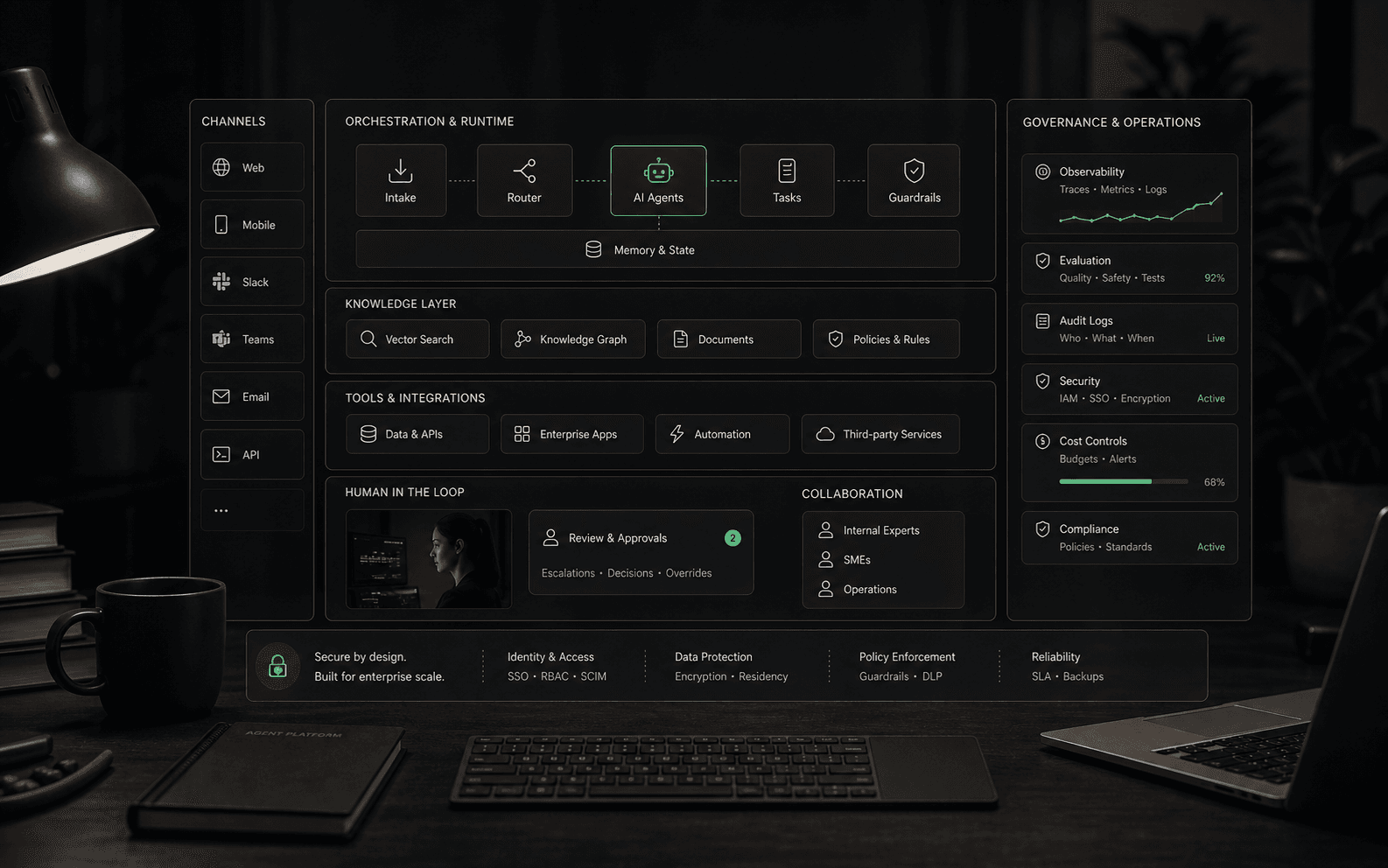
For business buyers, an AI agent is not just a chat window with a newer label. It is a system that can understand intent, retrieve relevant business context, decide the next permitted step, and either respond, route, draft, update, trigger, or escalate. The useful definition depends on the workflow boundary: what the agent may do by itself, what requires approval, and what must move to a human.
How it differs from a chatbot
- A basic chatbot usually follows a conversation pattern: answer a question, collect a lead, or point someone to a page.
- An AI agent may use business knowledge, customer context, permissions, and connected tools to progress a task.
- The distinction is not the word agent. The distinction is whether the system can reason over context, take bounded action, preserve state, and escalate with useful handoff context.
- A product can call itself an agent and still behave like a simple chatbot if it cannot use reliable knowledge, trigger approved workflows, or expose review controls.
How an AI agent works
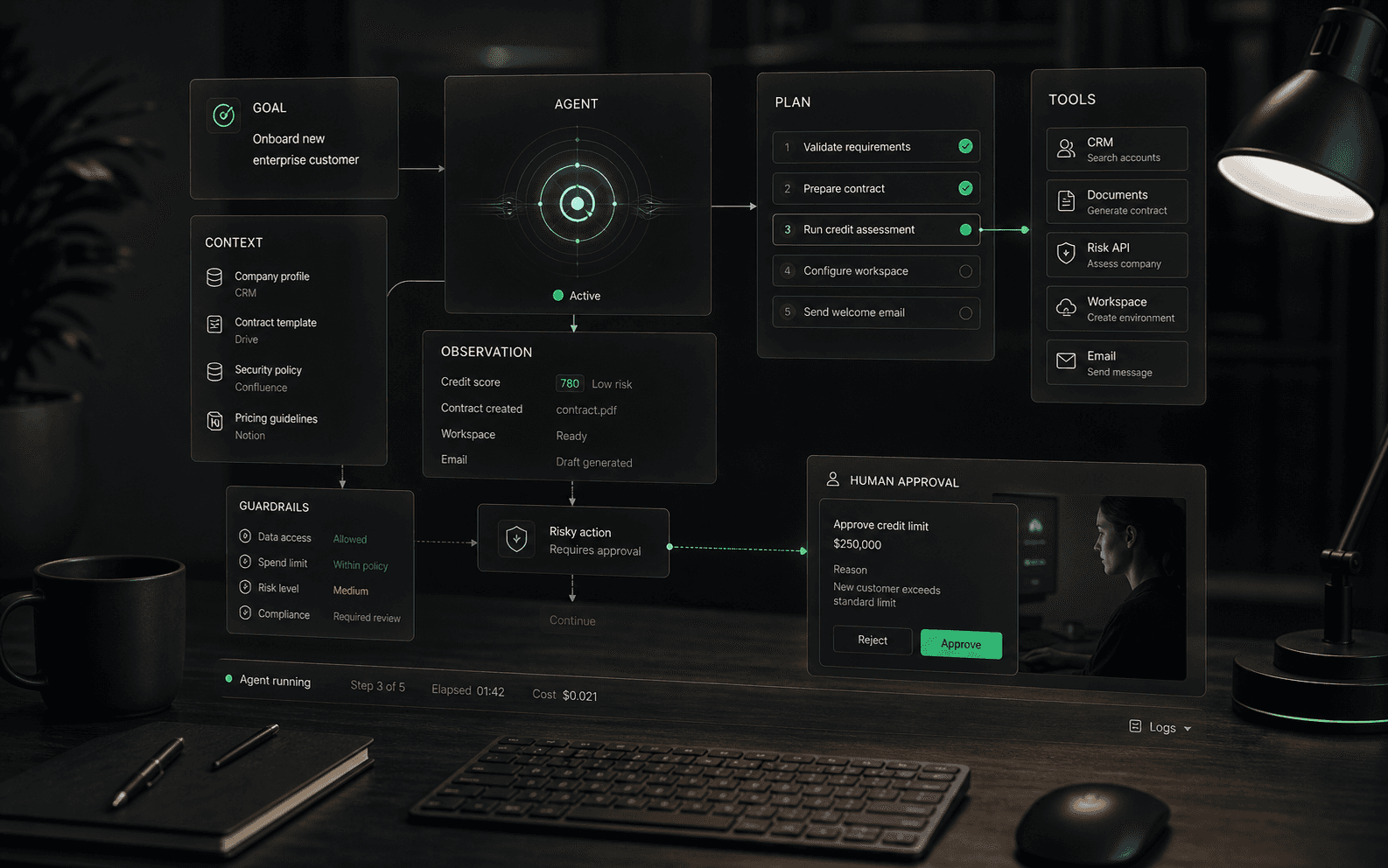
- Interpret: the system turns a request into an intent, task, or goal. In a business workflow, that might mean identifying whether a customer needs troubleshooting, order help, billing review, or escalation.
- Ground: the agent retrieves or receives context from approved sources such as help content, policies, account data, order records, previous tickets, or internal process notes.
- Plan: the agent decides the next permitted step. A simple case may need one answer; a complex case may require gathering details, checking a record, drafting a response, and routing to a human.
- Act: the agent may answer, classify, summarize, tag, route, draft, update a record, call a tool, or request approval depending on its permissions.
- Observe: the system records what happened, watches for failure or low confidence, and gives humans enough information to audit, improve, or take over the workflow.
Autonomy is a spectrum
The most important buying question is not whether the agent is autonomous. It is where autonomy starts and stops. A read-only agent that answers from public documentation carries different risk from an agent that changes account status, issues refunds, updates a CRM, or sends messages on behalf of a human. Buyers should ask vendors to map autonomy by workflow step: which steps are automatic, which require approval, which trigger escalation, and which are blocked entirely.
Where AI agents create value
AI agents are most useful when the work is repeatable but not perfectly scripted. In customer support, that can mean diagnosing an issue, finding the right policy, summarizing history, and routing to the right queue. In ecommerce, it can mean answering order questions, triaging return issues, or gathering the details needed for a human to approve a refund. In sales and operations, it can mean qualifying requests, preparing drafts, updating records, or initiating a workflow after the required checks pass.
What buyers should evaluate
- Knowledge grounding: Which sources does the agent use, how fresh are they, and can it show why an answer was chosen?
- Action permissions: What can the agent read, write, update, trigger, or submit without approval?
- Workflow limits: Which tasks are explicitly out of scope, and how does the agent behave when confidence is low?
- Human handoff: Can a person take over with conversation history, customer context, and the agent's attempted reasoning intact?
- Auditability: Can the team review answers, actions, escalations, and failures after the fact?
- Ongoing improvement: Does the platform show unanswered intents, stale content, poor handoffs, and repeated failure patterns?
Demo questions that reveal depth
- Show the agent handling a real customer question that requires policy context, not a generic FAQ answer.
- Show what happens when the source material conflicts or is missing.
- Show which actions require approval and which actions the agent can complete by itself.
- Show the handoff transcript a human receives after escalation.
- Show how the team reviews bad answers and improves the knowledge base or workflow rules.
Evaluation tests before launch
- Historical case test: run real past conversations through the agent and compare the proposed answer, routing, and handoff against what a strong human operator would have done.
- Missing context test: remove the required source or make the customer request ambiguous, then verify that the agent asks for clarification or escalates instead of inventing a confident answer.
- Permission test: ask the agent to perform an action it should not be allowed to complete, such as issuing a refund, changing account details, or revealing restricted information.
- System failure test: disconnect or degrade a tool the agent depends on and verify that the user experience, logs, and escalation path remain clear.
- Regression test: after changing prompts, workflow rules, or knowledge sources, rerun a fixed evaluation set to make sure older behavior did not quietly break.
Metrics that matter
Useful AI agent metrics measure completed work, not just conversation volume. Track task completion rate, correct escalation rate, answer accuracy on reviewed samples, human override rate, tool-call failure rate, time to resolution, cost per completed workflow, repeated failure topics, and customer satisfaction after agent-assisted interactions. Be careful with deflection as a standalone metric; an avoided human conversation is not a win if the answer was wrong, incomplete, or frustrating.
Concrete examples and non-examples
- Example: a support agent identifies a billing question, retrieves the current policy, checks the account tier, drafts a response, and escalates for approval because the customer is disputing a charge.
- Example: an ecommerce agent gathers order number, shipping status, return reason, and product condition before routing the case to the right team with the required context already attached.
- Non-example: a pop-up that answers three scripted questions from a static FAQ but cannot use customer context, tools, escalation rules, or post-conversation review.
- Non-example: a workflow automation rule that routes tickets based only on keywords. It may be useful automation, but it is not an AI agent unless it interprets context and operates inside defined reasoning and permission boundaries.
Common red flags
Be cautious when an agent demo depends on polished sample data, avoids edge cases, or cannot explain source use and action permissions. Other warning signs include vague claims about autonomy, no clear escalation path, no audit trail, and pricing that changes materially once real conversation volume, seats, channels, or workflow actions are included.
Related concepts
AI agents sit between several adjacent ideas: chatbots, copilots, workflow automation, RAG, tool calling, and human-in-the-loop review. The safest evaluation approach is to define the job first, then decide which combination of conversation, retrieval, tools, approvals, analytics, and human escalation is required. That keeps the buying process grounded in operating reality instead of vendor terminology.
Launch readiness
A production AI agent should launch with a test set, a rollback plan, named owners, review thresholds, and a known fallback path. Buyers should ask who watches the first week of conversations, how defects are triaged, how quickly bad answers can be corrected, and which metrics decide whether the agent expands or pauses. Without that operating plan, even a promising demo can become fragile in real customer traffic.
What strong content should make clear
A serious AI agent page should leave the reader with a usable operating model: define the job, define the data, define the tools, define permissions, define the human boundary, define tests, and define the review loop. If a vendor cannot explain those layers, the buyer is not evaluating an agent system; they are evaluating a demo.
Sources to verify
Use these references to understand the term and pressure-test vendor claims. Product-specific details still need to be verified against current vendor materials.
FAQ
Common questions
Is an AI agent the same as a chatbot?
Not always. A chatbot usually stays inside a conversation. An AI agent may also consult business knowledge, use connected tools, take approved actions, and escalate with context.
What makes an AI agent safer to use in business workflows?
Defined permissions, reliable knowledge sources, human handoff, action logs, testing, and clear limits on what the agent can do without approval.
Can an AI agent replace a support team?
It should not be evaluated that way. A better question is which repeatable work the agent can handle, where humans should stay in control, and whether the system improves response quality without creating hidden risk.
What is the difference between an AI agent and an AI assistant?
An AI assistant usually helps a person complete work by answering, drafting, summarizing, or suggesting next steps. An AI agent may go further by following a workflow, using tools, preserving context, and taking permitted actions inside defined boundaries. The difference is not always clean, so buyers should ask what the system can read, write, trigger, approve, and escalate rather than relying on the label.
What is an example of an AI agent in customer support?
A practical support agent might identify a customer's issue, retrieve the relevant policy, check order or account context, draft a response, tag the conversation, and escalate when the case needs human judgment. The important part is not that the agent writes a message; it is that it moves a bounded support workflow forward while preserving enough context for review.
How autonomous should an AI agent be?
Autonomy should match the risk of the workflow. Low-risk tasks such as summarizing a conversation or suggesting a help article may need lighter controls. Customer-impacting actions such as refunds, account changes, billing decisions, or public replies should have stronger permissions, approval gates, audit logs, and fallback rules.
What should buyers ask in an AI agent demo?
Ask the vendor to run real historical examples, not only polished sample prompts. The demo should show source retrieval, tool permissions, what happens when context is missing, how the agent escalates, what humans see during handoff, how actions are logged, and how bad answers are corrected after launch.
What are the biggest risks of AI agents?
The biggest risks are usually operational: stale knowledge, overbroad tool permissions, weak escalation, hidden costs from long multi-step workflows, poor testing, unclear ownership, and metrics that reward deflection instead of correct outcomes. Buyers should evaluate the operating model around the agent as carefully as the model output.
How do you measure whether an AI agent is working?
Useful measures include task completion rate, correct escalation rate, reviewed answer accuracy, tool-call failure rate, human override rate, time to resolution, repeated failure topics, and customer satisfaction after agent-assisted conversations. Conversation volume alone is not enough because a high-volume agent can still create bad outcomes.